![CoudDepot_LOGO_RGB.png]](https://kb.clouddepot.com/hs-fs/hubfs/CoudDepot_LOGO_RGB.png?height=40&name=CoudDepot_LOGO_RGB.png)
Background
Autotask is transitioning its Australian and New Zealand customers to a new Autotask Zone beginning in December 2025.
How will this impact you
The transition to a new zone is a significant change, as our sync software stores your zone details during the initial setup of the Autotask Cloud Depot API user.
After your account is migrated, the previously cached zone information will no longer be valid, resulting in sync failures such as a 401: Access Denied error.
While our system attempts to detect this issue and automatically recover, there may be instances where manual intervention is required to refresh the zone and restore the connection.
If your synchronisation is not functioning after migration, or you encounter a 401: Access Denied error or similar messages in your sync logs, please perform a zone refresh using the steps outlined below.
How to force a zone refresh
1. Log into Cloud Depot
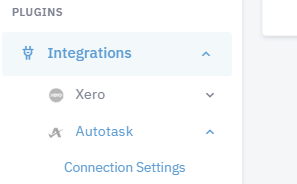
2. Navigate to Integrations -> Autotask -> Connection Settings
3. Click 'Test API Credentials'
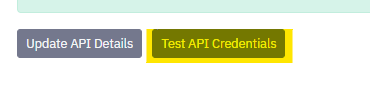
This action will verify your credentials and refresh your zone details.