![CoudDepot_LOGO_RGB.png]](https://kb.clouddepot.com/hs-fs/hubfs/CoudDepot_LOGO_RGB.png?height=40&name=CoudDepot_LOGO_RGB.png)
Recurring Payments > Configuration > Configure Automations
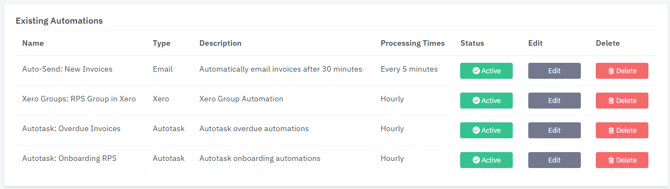
| Automation Name | Action |
| Auto-Send: New Invoices | Will send Invoices automatically to your customers. |
| Xero Group: RPS Group in Xero | Automatically adds or removes Xero contacts from a Xero group based on their RPS status when payments are set up or Auto Payments are enabled. |
| Autotask: Overdue Invoices | Prevent Bad Debt Automatically: Cloud Depot tracks outstanding invoices to automatically calculate when a client exceeds your payment terms (such as 90 days overdue). It then flags an On Stop Credit alert on the Autotask Company and Ticket screens so technicians instantly know to pause work before accumulating further debt. |
| Autotask: Onboarding RPS | Automatically onboards customers for payments, creates them in Xero and displays their current payment status in a single UDF on the Autotask company record. |
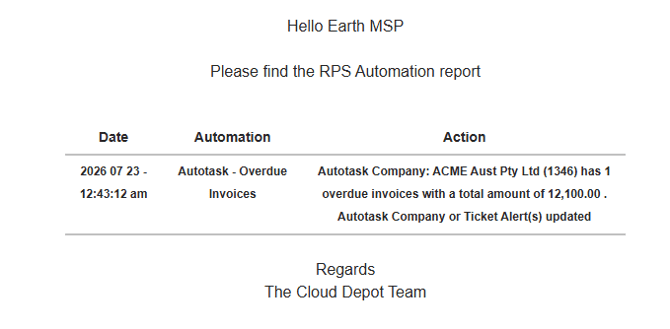
Summary Report
All automations can send an automation summary email once processing is complete. This summary report is sent to the default email address set in your Payment Global Options page.
FAQ
Q: When does the automation run?
A: Every hour between 9am and 6pm your local time excluding weekends
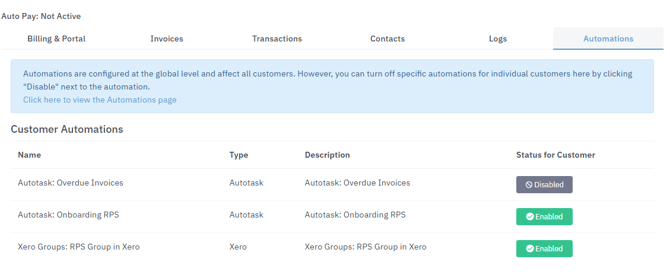
Q: Can I exclude some customers from the Automations?
A: Yes, you can disable any automation for a customer from the Automations tab in their customer card. You can also view any automations that have been applied to that customer.
Q: What is the purpose of the Xero Groups Automation?
A: This automation supports our partnership with PaidNice, the accounts receivable tool. Adding customers to Xero Groups allows PaidNice to apply specific rules to those customers.